We accept

Product ID: GIG-GS32QC·GIGABYTE
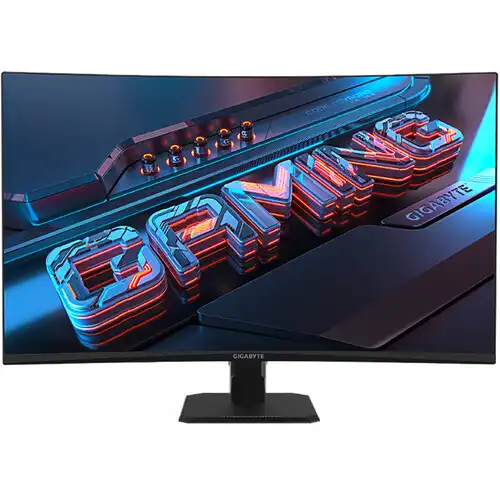
Gigabyte GS32QC 32" QHD 2K (2560 x 1440), 165Hz/OC 170Hz, 1ms, VA Backlight Led Monitor with DP, HDMI and USB Port. Brand: Gigabyte.
Model: GS32QC
Resolution: QHD 2560 x 1440
Display: VA, 165Hz/OC 170Hz, 1ms MPRT
Ports: 2x HDMI, 1x DP, 1x Audio
Features: HDR ready, Free Sync, Flicker Free, 1500R Curved
EMI starts from ৳ 3,542/month
Share this product
. Prices in ৳ are display-only and are not a charge.
| Specifications | Size | 32" |
|---|---|---|
| Panel Type | VA | |
| Resolution | 2560 x 1440 | |
| Pixel pitch(MM) | 0.2724*0.2724 | |
| Viewing Angle | 178°(H)/178°(V) | |
| Brightness | 300 cd/m2 (TYP) | |
| Contrast Ratio | 3500:1 | |
| Curvature | 1500R |
The GIGABYTE GS32QC 31.5" 165Hz Curved Gaming Monitor comes with its quick refresh rate, deep color reproduction, and 1500R curvature which offers players smooth gameplay and detailed visuals. By using a 1 ms (MPRT) response time, the amount of time it takes for pixels to change from one color to another is reduced, and an on-screen image refreshes 165 times per second at a refresh rate of 165 Hz. The AMD Free Sync Premium and Adaptive-Sync feature of GIGABYTE GS32QC Curved Gaming Monitor improves the graphics even further by lowering stuttering, screen tearing, and other artifacts from fast-paced action scenes on graphics cards that are compatible.
The GIGABYTE GS32QC monitor is sometimes undervalued as an unseen player. In actuality, monitors work in concert with other PC components to maximize their performance. With the best features and quality available, GIGABYTE gaming monitors allow customers to experience premium performance without going overboard.
GS32QC monitor has a vision that is more akin to what the human eye sees than a flat monitor, the 31.5" 1500R VA panel gives you a more immersive experience.
The GIGABYTE GS32QC gaming monitor has aim stabilizer feature which will lessen motion blur, improving visual clarity and making it easier to aim at targets and follow the trajectory of projectiles. The on-screen timer will help you keep track of the amount of gaming time that has passed. You can use this function to personalize your crosshair, which will help you aim better in shooting games. The Black Equalizer enhances the black side's details without changing the other portions of the screen. To more clearly identify your hidden adversaries, just activate this function.
No reviews given yet.
Have an account? Sign in to keep track of your reviews.
No questions asked yet.
Have an account? Sign in to keep track of your questions.